AI in Tally is now a working feature, not a promise. Since TallyPrime Release 7.1 (20 May 2026), a plug-in called Docs by Ira reads a PDF or image of an invoice, pulls out the party, invoice number, GST and line items, and prepares a draft voucher. You then review the draft, fix what is flagged and save it. Until you approve it, nothing reaches your books.
By Sandeep Bajoria, Co-Founder & Academic Director, Tally Institute of Learning – Baguiati. About 30 years in IT and accounts training. Last updated 14 October 2026. Every Tally detail below was checked against Tally Solutions’ own help pages on that date.
The short version:
- What it is: Docs by Ira is the first feature of TallyIra, Tally’s AI capability inside TallyPrime.
- What it does: turns a PDF or image of an invoice into a draft voucher for your review.
- What you need: a licensed TallyPrime in India, Release 7.1 or above, with an active TSS. A copy running in Educational Mode cannot use it.
- What it costs: 100 free pages to start, then paid packs.
- Its limits: English, digitally created documents only, one transaction per file. Handwritten invoices are not supported yet.
- Your job: check every draft. That is where accounting knowledge earns its place.
In this guide:
- What is AI in Tally?
- How Docs by Ira turns an invoice into a voucher
- What you need to use it
- Supported files and voucher types
- What it costs
- Accuracy and common exceptions
- What TallyPrime 7.2 changed
- What the AI does and what an accountant still does
- Will AI replace accountants?
- How we teach it in Baguiati
- Frequently asked questions
- Sources
What Is AI in Tally?
AI in Tally means TallyIra, the AI capability Tally Solutions built into TallyPrime from Release 7.1. Its first feature is Docs by Ira, which reads business documents such as invoices and bills and prepares draft vouchers for your review. It never posts entries on its own, and it works only on licensed TallyPrime in India.
Tally released TallyPrime 7.1 on 20 May 2026 and introduced TallyIra with it. Docs by Ira is the first TallyIra offering. In addition, a second route runs through the TallyIra mobile app for Android and iOS, which scans or uploads a document on your phone and sends it to TallyPrime.
Tally’s own page says the feature saves 80% of the time spent on manual data entry. However, that is Tally’s figure, not an independent measurement, and your result will depend on how clean your invoices and masters are. Tally also states that your documents are used only to process your work. It says they are never shared and never used to train models for anyone else.
How Does Docs by Ira Turn an Invoice Into a Voucher?
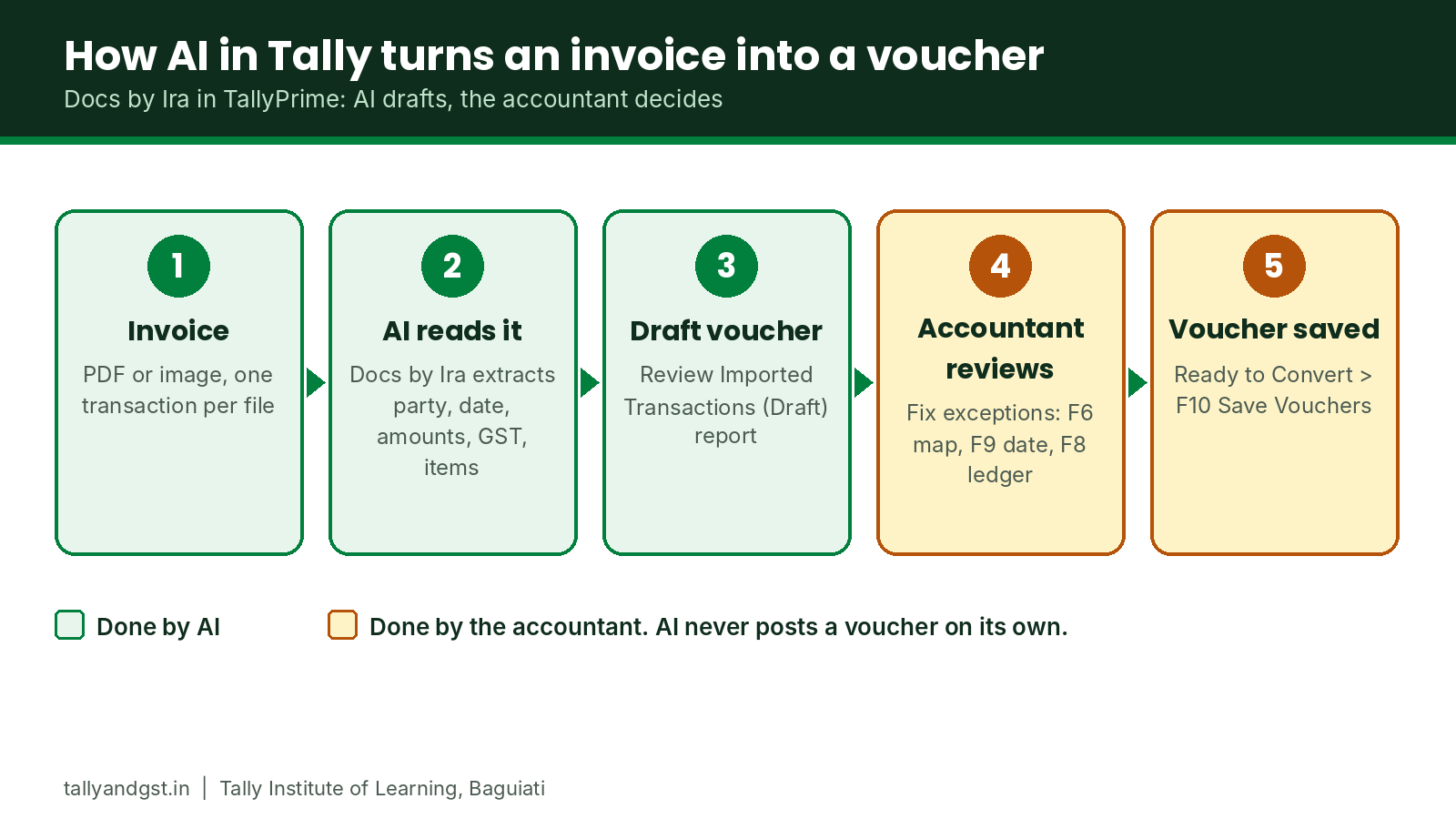
You import or scan an invoice, Docs by Ira extracts its details, and TallyPrime lists the result as a draft transaction. You open the Review Imported Transactions report, resolve any red-flagged exceptions, and press F10 to save the vouchers marked Ready to Convert. Only then do the entries reach your books.
The Desktop Route, Step by Step
First, follow these six steps on the desktop:
- Register and load the plug-in. Enter your licence serial number on Tally’s TallyIra page and verify the OTP. In TallyPrime, press F1 (Help) > Settings > License > Manage License > F5 (Update). Then press F1 > Tally Plug-Ins and confirm that Docs by Ira is listed and loaded.
- Press Alt+O (Import) and choose Transactions (PDF & Images) under Docs by Ira. Pick the voucher type, the import mode, the file path and the file. Tally recommends keeping the “Backup Company Data before Import” option on Yes.
- Accept the terms once. The first import asks for the licence administrator’s Tally.NET ID and password, and consent to the terms and privacy policy.
- Open the draft report. After import, the Review Imported Transactions (Draft) report appears. Red indicators mark exceptions, and the Remarks column says what is wrong. Press Alt+I to view the original file next to the draft.
- Fix the exceptions. Map a missing master with F6, set a wrong date with F9, or set a common accounting ledger with F8. You can do this in bulk or inside each voucher.
- Save. Under Ready to Convert, select the transactions and press F10 (Save Vouchers). Open the Day Book to confirm they were created.
Which Voucher Type Should You Choose?
Choose the voucher type from your side of the transaction, not from the title printed on the document. For example, a supplier’s sales invoice becomes a Purchase voucher in your books, and Tally’s own import guide uses that exact example. However, it is also the kind of slip a new learner can make without noticing.
Autofill and the TallyIra App
Besides the import route, two shorter routes exist. Autofill (Ctrl+F inside a voucher, with the activity set to Docs by Ira) fills one voucher from one document. Meanwhile, the TallyIra app needs the administrator to enable user access, and your mobile number must be added in TallyPrime under Company > Security. After that, you scan or upload documents on the phone and send up to 10 files at a time.
What Do You Need to Use Docs by Ira?
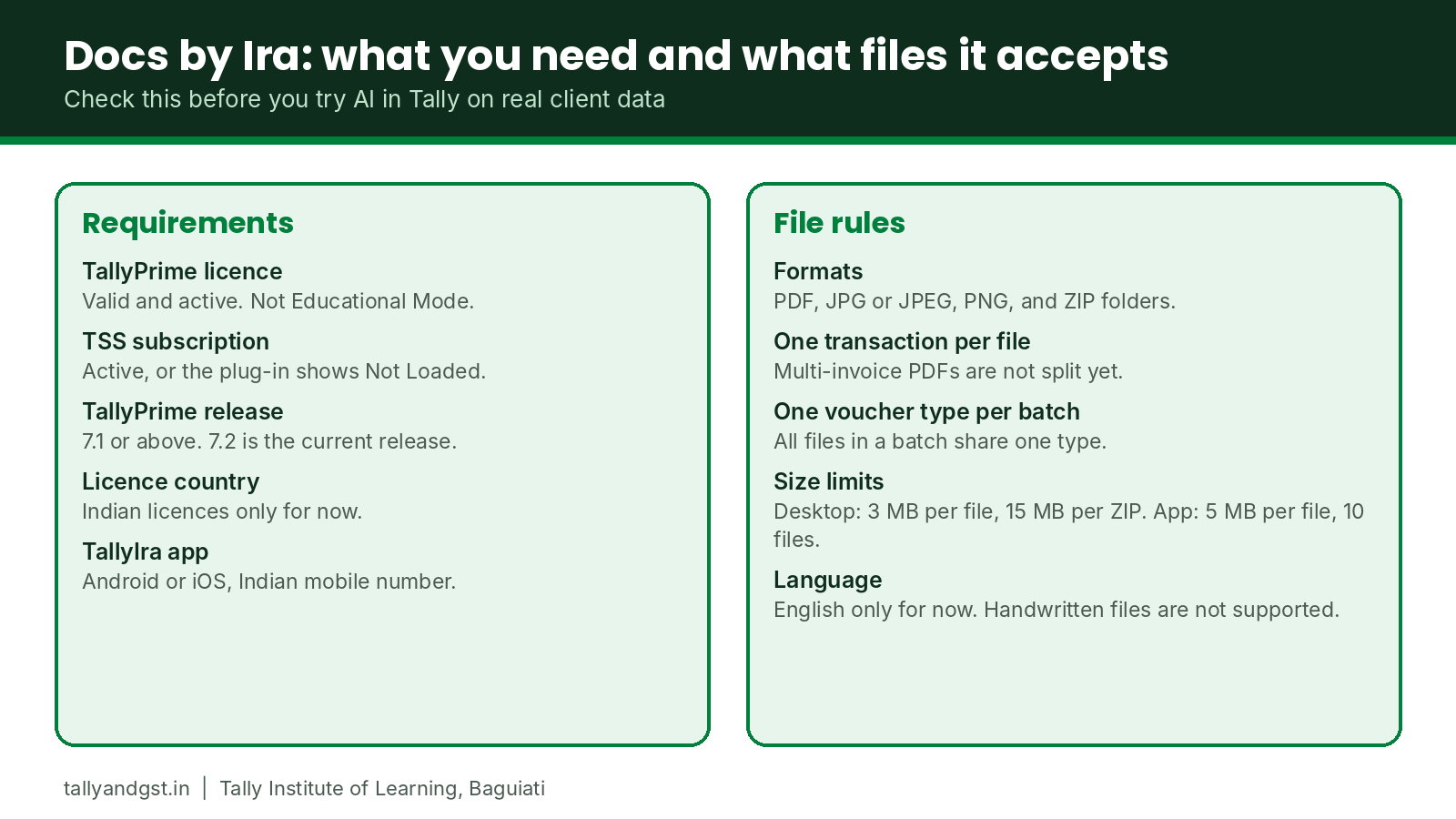
You need a valid TallyPrime licence in India, an active Tally Software Services (TSS) subscription, and TallyPrime Release 7.1 or above. A TallyPrime running in Educational Mode cannot use the plug-in. Registration takes your serial number and an OTP, and 100 free pages are included to start.
| Requirement | Detail |
|---|---|
| TallyPrime licence | Valid and active. Tally says a copy in Educational Mode cannot use Docs by Ira or the TallyIra app. |
| TSS subscription | Active. With an expired TSS the plug-in shows “Not Loaded” and you must renew. |
| TallyPrime release | 7.1 or above. TallyPrime 7.2 (12 October 2026) is the current release. If your TSS is active, Tally says the upgrade is free. |
| Country | Indian licences only for now. |
| Registration | Serial number and OTP on Tally’s TallyIra page, then a licence update inside TallyPrime. |
| TallyIra app | Android or iOS, an Indian mobile number added in TallyPrime, and user access given by the administrator. |
However, one older Tally FAQ page still says Release 7.0. Tally’s own TallyIra page and its getting-started guide both say 7.1 or above, so plan for 7.1 or later. Since 7.2 is out, there is also little reason to stay on an older release.
Which Files and Voucher Types Does Docs by Ira Support?
Docs by Ira creates nine voucher types: Sales, Purchase, Credit Note, Debit Note, Delivery Note, Receipt Note, Sales Order, Purchase Order and Journal Voucher. It reads digital PDFs and images in English, one transaction per file. Handwritten documents and bank statements are not supported.
| Rule | What Tally says |
|---|---|
| File formats | PDF, JPG or JPEG images, and ZIP folders. Tally’s import guide also lists PNG. |
| One transaction per file | A PDF with several invoices is not split correctly. Multi-invoice PDF support is listed as upcoming. |
| One voucher type per batch | When you import several files or a folder, every file must belong to the same voucher type. |
| Size from desktop | 3 MB per file and 15 MB per ZIP folder. |
| Size from the TallyIra app | 5 MB per file, with a maximum of 10 files per upload. |
| Language | English only. Non-English script invoices are listed as upcoming. |
| Not supported | Handwritten documents, bank statements, Word or Excel files (save them as PDF first), and files sitting in Google Drive or OneDrive. |
| Quality | A clear, legible file. A blurred photograph reduces accuracy. |
| Batch size | Tally suggests importing in smaller batches, for example 100 files at a time. |
| File retention | Imported files stay available for 7 days, or until the draft is converted to a voucher. |
How Much Does Docs by Ira Cost?
Every eligible serial number gets 100 free pages to start. After that you buy a pack: the Regular pack comes in 200, 400 or 600 pages, and the Pro pack gives 3,000 pages. Each pack is valid for one year. Tally lists current prices on its TallyIra page, so check there before you buy.
Quota is counted in pages, not invoices, so a three-page invoice uses three. TallyPrime shows your remaining balance before each import. Besides that, the Quota Usage Summary report shows usage at any time. Also, Tally’s FAQ says you can cancel and get a refund if you contact TallyCare within 15 days of purchase.
However, Tally’s pages differ on the free allowance. The TallyIra page calls the 100 pages a one-time allowance, while the help pages say you can use them for two months. So check the balance on your own customer portal to see which applies to your serial number.
How Accurate Is Docs by Ira, and What Happens When It Gets Something Wrong?
Tally measures accuracy with an F1 score, which counts both how many extracted values are correct and how many essential fields were extracted at all. Tally publishes no single accuracy percentage. When the AI is unsure or a value does not match your books, the draft carries a red exception for you to fix.
How Tally Measures Accuracy
Tally checks four groups of fields: general details (invoice number, date, total), party details (supplier name and GSTIN/UIN), item details (name, rate, unit, GST rate) and ledger details. For example, its own illustration is an invoice with 100 fields where at least 95 essential fields are extracted and at least 90 of those are correct. However, that is an illustration of the measure, not a promise for your invoices.
Common Exceptions and How to Fix Them
| What you see | What it means | What you do |
|---|---|---|
| Missing master | The party, item or ledger is not in your company data. | Create it from the extracted value, or save the voucher to create all missing masters. |
| Master mismatch | The master exists under a different name. | Map it once with F6. Docs by Ira remembers the mapping for next time. |
| Date outside the current period | The invoice date does not fall in the period set in TallyPrime. | Set the correct date with F9. |
| Voucher total mismatch | Extracted values do not add up to the invoice total. | Check the original with Alt+I. If the values are right, open the voucher and press Ctrl+A to recalculate. |
| Potential duplicate | The same file was imported twice, or a matching voucher exists. | Press Ctrl+S, compare reference number, amount and party, and delete the extra. |
| Freight read as a stock item | A charge laid out like an item row was treated as an item. | Correct the entry by hand. |
| Round-off missing | The invoice did not show a round-off line. | Add the round-off ledger while creating the voucher. |
How Docs by Ira Matches Parties, Items and Place of Supply
Docs by Ira matches a party ledger by GSTIN/UIN first and by exact name second. For stock items, it tries the part number first and the name second. For place of supply, it uses the invoice, then the GSTIN configuration under F11, then the buyer state, then the company state. Knowing that order helps you see why a draft chose a particular tax treatment. In addition, it is the same logic a GST student learns for the Interstate versus Intrastate decision.
Besides these, Tally’s FAQ lists several cases where fields come out wrong or blank: blurred scans, text overlapping a stamp or watermark, tax-inclusive amounts misread in unusual layouts, and phone numbers or bank details, which it does not extract at all. That is why the review step exists.
What Did TallyPrime 7.2 Change?
TallyPrime 7.2, released on 12 October 2026, adds a Get Started with TallyIra option under F1 (Help), purchase order print templates, GSTR-9 export, updated e-TDS and e-TCS returns, and login sessions of up to 30 days for e-Invoicing and e-Way Bill.
- Get Started with TallyIra: if the plug-in is not installed, the option opens the TallyIra page so you can link your serial number. If it is installed, it opens the Docs by Ira help.
- Try Now tile: a tile on the Gateway of Tally that points out features relevant to your business from time to time.
- Invoice Print Templates for Purchase Orders, with an option to auto-save changes made in Print, Export and Share to your user templates.
- TDS and TCS returns: support for Protean (formerly NSDL) FVU Tool 1.2, covering Forms 144, 143 and 140 for non-salary returns and Form 138 for salary TDS.
- Extended sessions: e-Invoicing and e-Way Bill logins can last up to 30 days, in addition to the earlier 6-hour validity. You can switch the extended session on or off.
- GSTR-9 export: export the HSN/SAC Summary or all sections of the Annual Computation report to the GSTR-9 file, then reconcile with the data on the GST portal.
What Does AI in Tally Do, and What Still Needs an Accountant?
The AI reads and drafts. The accountant decides and approves. Docs by Ira removes most of the typing, but choosing the voucher type, confirming the ledger, checking GST and approving the entry stay with a person who understands accounts.
| Task | What Docs by Ira does | What the accountant does |
|---|---|---|
| Reading the invoice | Extracts party, invoice number, date, amounts, GST and line items. | Compares the draft with the original, especially amounts and tax. |
| Voucher type | Creates the type you select at import. | Decides whether the document is a purchase, a sales return, a journal or an order. |
| Ledger | Suggests a ledger from GST rate, HSN/SAC and nature of transaction. | Confirms the treatment, for example whether a spend is an expense or an asset. |
| Masters | Finds the closest match and offers to create or map. | Decides whether this is a new party or an existing one under another name. |
| GST | Reads the tax details printed on the invoice. | Checks the GSTIN, the rate and the place of supply, and reconciles with the GST portal. |
| Duplicates | Flags likely duplicates. | Decides which entry stays. |
| Posting | Never posts. | Approves and saves. |
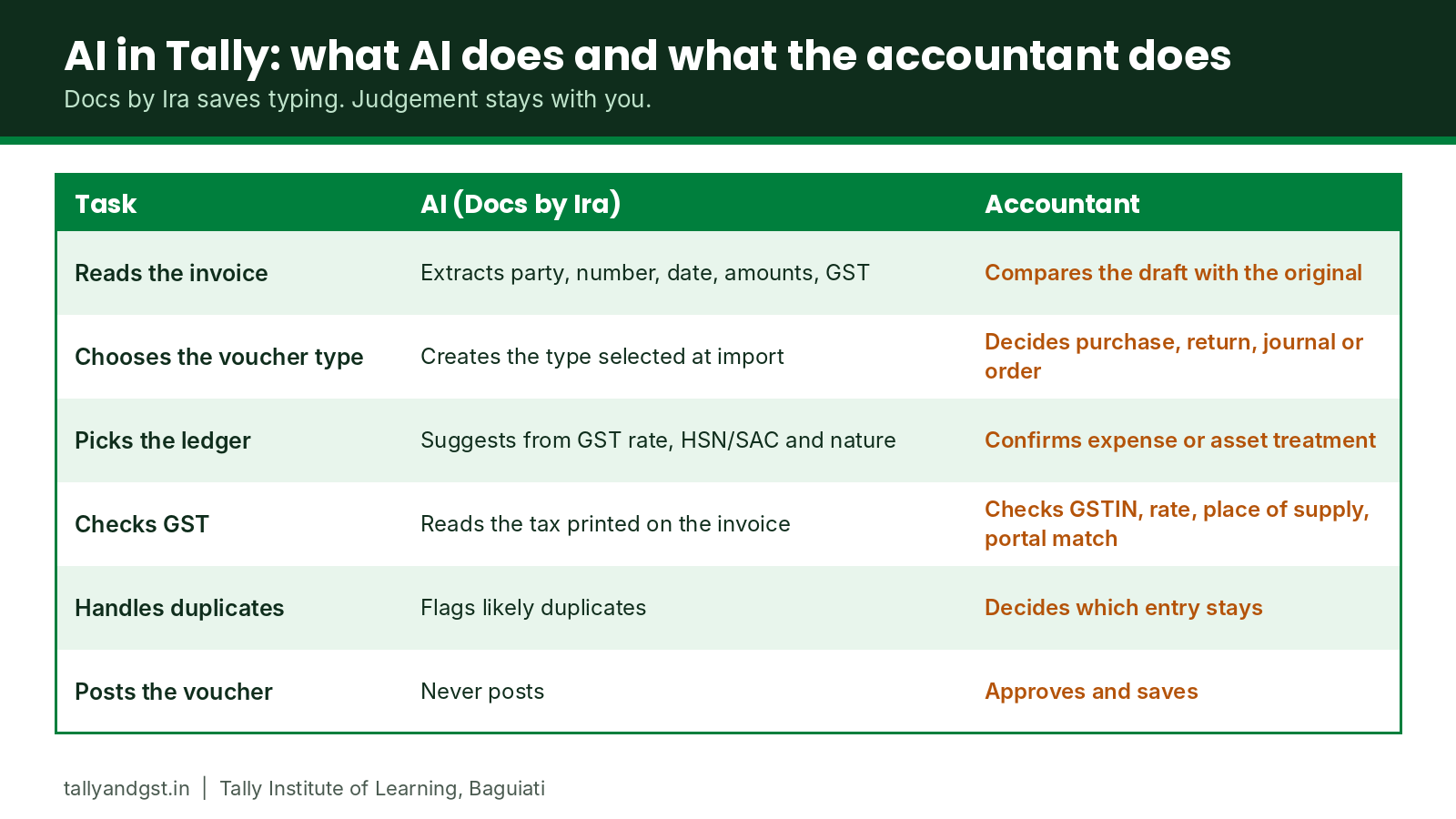
Each row in that right-hand column maps to something taught in a normal Tally course. For example, voucher types and ledger treatment belong to the recording and reporting level. Next, party and item masters sit in the accounts payable and receivable level. Finally, GSTIN checks, place of supply and reconciliation belong to the GST and TDS level. As a result, a learner who skipped those lessons would approve drafts without being able to tell which ones are wrong.
Will AI Replace Accountants?
Our view as trainers is that it will replace the typing before it replaces the accountant. Tally built Docs by Ira around review, so it drafts, flags mismatches and leaves the approval to a person. As a result, someone still has to know whether a draft is right, and that person needs the fundamentals.
Overall, what changes is where a fresher’s hours go. Instead of keying in invoices, a fresher spends more time checking, mapping masters cleanly and handling exceptions. A clean master list matters more than before, because consistent party and item names let the saved mappings work. For anyone starting now, the useful order is first accounting fundamentals, then TallyPrime, then GST and TDS, and finally the AI layer on top.
How We Teach AI in Tally at Tally Institute of Learning – Baguiati
We teach on licensed TallyPrime and always move to the latest release. Today that is TallyPrime 7.2 on the multi-user Gold edition. Our trainers show Docs by Ira to students as a live demonstration on a licensed copy in class, and students then practise the same steps.
The demonstration runs on a licensed copy for a practical reason. Because Tally says a TallyPrime in Educational Mode cannot use the plug-in, a student working on a free practice copy at home would not see it. Meanwhile, our trainers are still testing Docs by Ira with different kinds of invoices, and we will publish what they find in a separate post.
In practice, the AI layer sits on top of the courses it depends on. Our Tally Essential course covers recording, masters, accounts payable and receivable, GST and TDS, while our Tally Professional course goes further into advanced GST, TDS, TCS and payroll. If you are still choosing a course, our complete Tally course guide compares syllabus, duration, fees and certificate side by side.
Frequently Asked Questions About AI in Tally
What is AI in Tally?
It is TallyIra, the AI capability inside TallyPrime from Release 7.1. Its first feature, Docs by Ira, reads invoices and other transaction documents and then prepares draft vouchers that you review before saving.
Is Docs by Ira free?
You get 100 free pages to start. After that you buy a pack, either Regular (200, 400 or 600 pages) or Pro (3,000 pages), each valid for one year. Current prices are on Tally’s TallyIra page.
Which TallyPrime version do I need for Docs by Ira?
Release 7.1 or above, with an active TSS and an Indian licence. Also, TallyPrime 7.2 is the current release. If your TSS is active, Tally says the upgrade is free.
Can I use Docs by Ira in the free educational version of TallyPrime?
No. Tally states that you need an active TallyPrime licence, so a copy in Educational Mode cannot use the plug-in or the TallyIra app.
Does Docs by Ira post entries to my books automatically?
No. It creates draft vouchers. Your company data changes only after you review the drafts and save them as regular vouchers. Tally also recommends a company data backup before every import.
Which voucher types can Docs by Ira create?
Sales, Purchase, Credit Note, Debit Note, Delivery Note, Receipt Note, Sales Order, Purchase Order and Journal Voucher. Tally added Journal Voucher support in a later Docs by Ira release, which is why an older FAQ page lists only eight.
Can Docs by Ira read handwritten or non-English invoices?
Not yet. For now, it supports English-language, digitally created documents. However, Tally lists handwritten invoices and non-English script invoices as upcoming features.
Can I upload one PDF that contains many invoices?
Not today. Each file must hold one transaction, and a batch must be one voucher type. Although Tally lists multi-invoice PDF support as upcoming, it is not available yet. Instead, upload a folder or a ZIP file of single-invoice PDFs when you have many invoices.
Is my business data safe with Docs by Ira?
Tally states that documents are used only to process your work and are never shared or used to train models for others. Also, you accept its terms and privacy policy once, at your first import.
Do accountants still need to learn Tally if AI creates the vouchers?
Yes, because the AI produces drafts, and every draft needs someone who can spot a wrong voucher type, ledger or tax treatment. That skill comes from learning accounting and Tally properly.
Where can I learn Tally with Docs by Ira in Kolkata?
At Tally Institute of Learning – Baguiati, trainers demonstrate Docs by Ira live on licensed TallyPrime 7.2 in class, and students then practise the steps alongside the Tally Essential and Tally Professional courses.
Sources
Tally changes features, limits and prices often, so check the pages below before you buy a pack or upgrade. All were read on 14 October 2026.
- TallyIra and Docs by Ira on Tally Solutions
- Docs by Ira in TallyPrime for Voucher Creation (TallyHelp)
- Get Started with Docs by Ira (TallyHelp)
- Create Vouchers Using Docs by Ira (TallyHelp)
- Use the Review Imported Transactions Report (TallyHelp)
- Docs by Ira FAQ (TallyHelp)
- Quick Tips for Using Docs by Ira (TallyHelp)
- Release Notes for Docs by Ira (TallyHelp)
- TallyPrime Release 7.1 notes
- TallyPrime Release 7.2 notes
Reviewed by Sandeep Bajoria, Co-Founder & Academic Director, Tally Institute of Learning – Baguiati. Last updated 14 October 2026.
Have Questions? Get in Touch
Speak to our counsellors or browse our full course catalogue.
Ready to Start Learning?
Explore full course details and enrol online.